
To Do:
- Staging directory structure is:
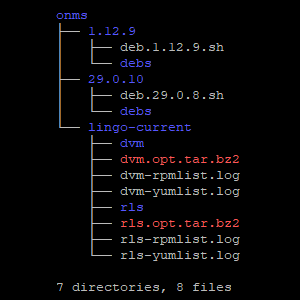
Download Onms 1.12.9 deb without dependencies & place in ~/onms/1.12.9/debs .for name in ${Packages}dowget https://debian.opennms.org/dists/opennms-1.12/main/binary-amd64/${name}done
List of Onms 1.12.9 deb packages: Onms-1.12.9.debsDownload Onms 29.0.10 (29.0.8 currently installed) & place in ~/onms/29.0.10/debsfor name in ${Packages}dowget https://debian.opennms.org/dists/opennms-29/main/binary-amd64/${name}
done
List of Onms 29.0.10 Debian Packages: Onms-29.0.10.debsRequest list of installed pkgs from Mike
rpm -qa >>list-of-rpm-pkgs.txtyum list installed >>list-of-yum-pkgs.txt
Old OpenNMS installed rpm list: rls-rpmlist
Old OpenNMS installed yum-pkgs: rls-yumlist
New OpenNMS installed rpm list: dvm-rpmlist
New OpenNMS installed yum list: dvm-yumlist- Install only Onms pkgs from each version
upload dvm.opt.tar.bz2 & rls.opt.tar.bz2 to ~/onms/create ~/onms/dvm , ~/onms/rls & untar respective tar.bz2 archives- compare list of packages in 1.12.9 repository with rls installed packages
- install debs without dependencies for each version, create tar & pipe to ~/onms/clean-install-1.12.9 & ~/onms/clean-install-29.0.10 and uninstall debs after each tar pipe.
- Identify and remove all binary files from ~/onms/clean-install-*
- Run contextual diffs on all configurable files of ~/onms/clean-install-*
- Document files clean-install-* differences & produce sed scripts if needed
- Identify and remove all binary files from ~/onms/lingo-current/*
- Run contextual diffs on all configurable files of ~/onms/lingo-current/*
- Document lingo-current/* files differences & produce sed scripts if needed
- Create report & MOP
- Create & deliver archive of config files